
mone

WOS

WOS
2k+ Sold

Faster Self Top-Up! Click "?" for details.

Description
Whiteout Survival Login Top-Up Service

WOS Top Up — Buy Whiteout Survival Packs on Mone

Complete your WOS top up on Mone and buy the exact Whiteout Survival pack you need at a competitive price. Select the matching pack denomination, complete payment, then provide the Google or Facebook account linked to your game, character name, UID and a screenshot of the pack. Most Whiteout Survival login top-up orders are completed in about 5 minutes after all required information and any requested verification code are received.

✓  Google / Facebook ⚡  About 5 minutes 💬  24/7 support
Whiteout Survival login top up and WOS packs on Mone

What Is a Whiteout Survival Login Top Up?

A Whiteout Survival login top up allows Mone to purchase a specific in-game WOS pack on your behalf. It is suitable for event packs, limited-time offers and other packages shown inside your account. To process the order, provide the login details for the Google or Facebook account linked to Whiteout Survival, your character name, UID and a clear screenshot of the exact pack. A verification code may also be required when you sign in through Google.

Prefer an ID-only recharge? Buy Whiteout Survival Frost Stars without providing account login details on our Whiteout Survival Frost Stars UID Top-Up page .

Price Comparison

Whiteout Survival Top Up Prices — Compare WOS Packs

Compare Whiteout Survival pack prices and choose the denomination that matches the in-game offer you want. The pack name, contents and price must match the screenshot submitted with your WOS top-up order.

Pack In-Game Price Mone Price Discount
Any $0.99 Pack $0.99 $0.78 22% off
Any $1.99 Pack $1.99 $1.57 23% off
Any $2.99 Pack $2.99 $2.35 22% off
Any $3.99 Pack $3.99 $3.13 22% off
Any $4.99 Pack BEST VALUE $4.99 $2.99 40% off
Any $9.99 Pack $9.99 $7.84 22% off
Any $19.99 Pack $19.99 $15.69 22% off
Any $49.99 Pack $49.99 $39.23 22% off
Any $99.99 Pack $99.99 $80.33 20% off
$4.99–$99.99 ALL-IN-ONE $184.95 $158.78 15% off

Prices and discounts may change. The current price is shown on the product page and again before payment.
Top-up Procedures
Whiteout Survival Login Top-Up

How to Top Up WOS Packs on Mone

Choose your preferred Whiteout Survival pack, complete the payment and submit accurate account information. Most WOS login top-up orders are completed in about 5 minutes after all required details have been received.

01

Select a Whiteout Survival Pack

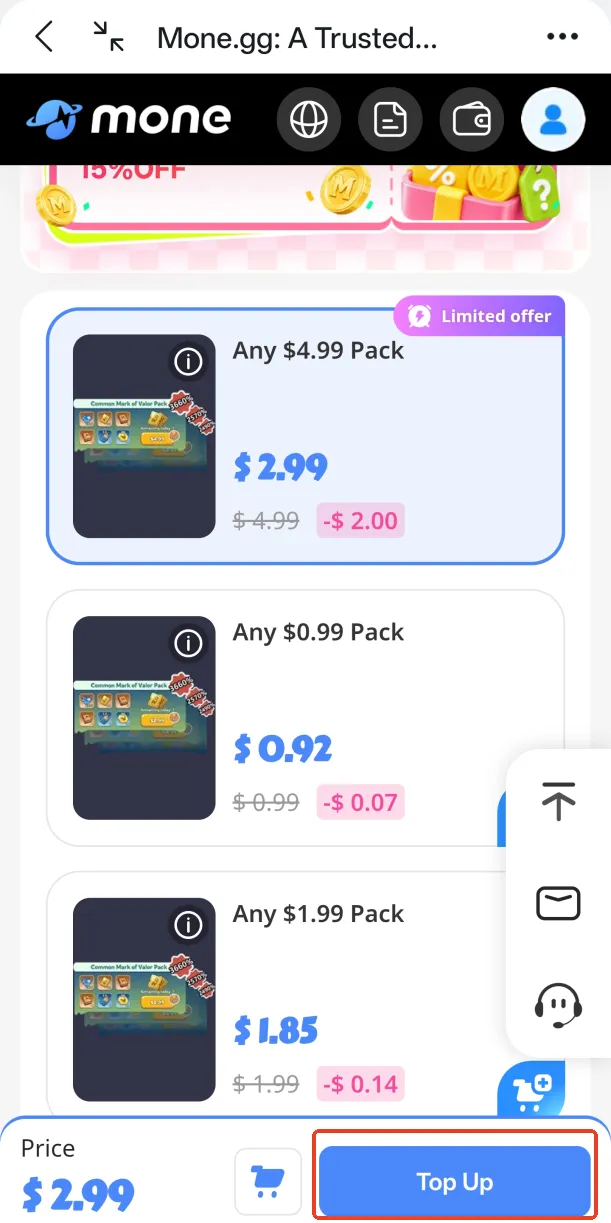
Choose the WOS pack or denomination you want to purchase, confirm the quantity and tap “Top Up”.

Select the required WOS pack and tap “Top Up”
02

Complete the Payment

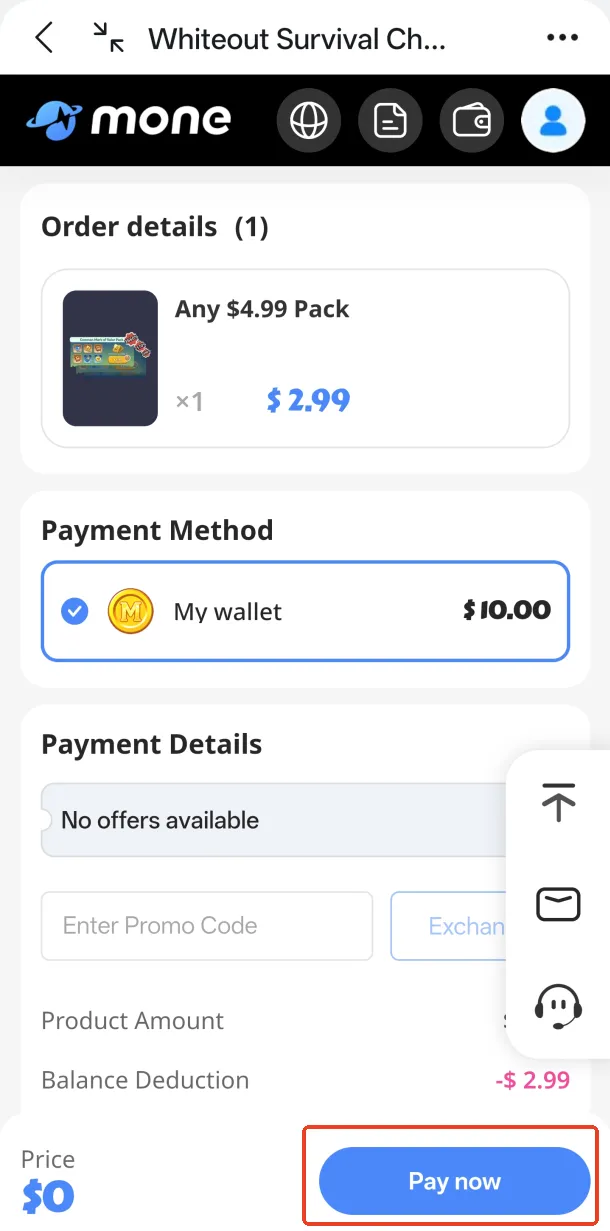
Check the selected pack and order amount, choose an available payment method and tap “Pay now”.

Available payment methods are displayed during checkout and may vary depending on your region.

Confirm the order and complete payment
03

Submit Your Account Information

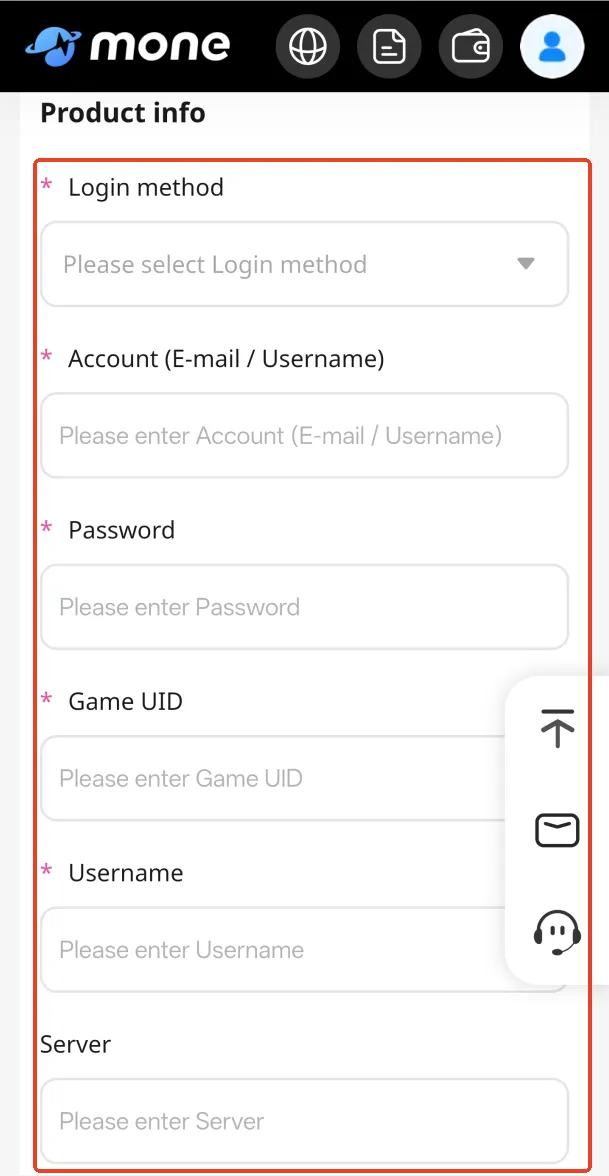
After payment, carefully complete the top-up information form. Incorrect or incomplete details may delay delivery.

Login method: select the Google or Facebook account linked to Whiteout Survival.

Account information: enter the linked e-mail address or username and the required login information.

Whiteout Survival ID: provide the Whiteout Survival ID of the account that should receive the pack.

Character name and server: enter the exact information displayed in your game profile.

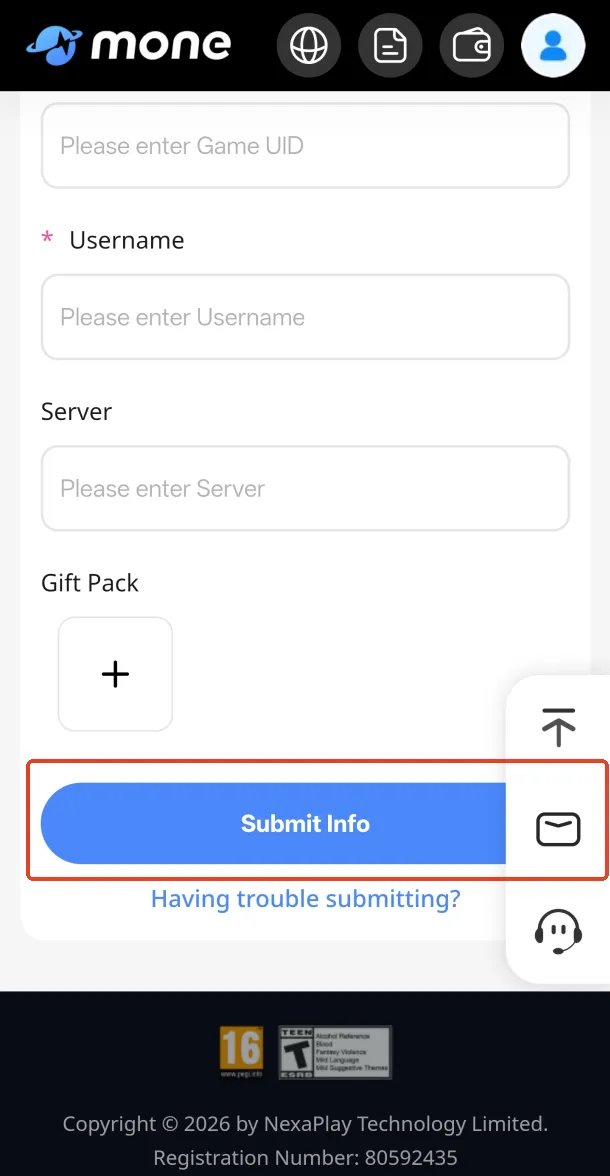
Pack screenshot: upload a clear screenshot showing the exact pack, its price and contents.

Enter the required WOS account information
Upload the pack screenshot and tap “Submit Info”
04

Track Your Order and Complete Verification

If additional verification is required, the Mone support team will contact you through online support. Keep communication available and provide the current verification code promptly.

Track the order in the Mone Order Center. Most WOS login top-up orders are completed in about 5 minutes after the correct information and any required verification code have been received.

Need help? If the order is delayed or you encounter a problem, contact Mone customer support using the button in the lower-right corner of the page.
Order Center

How to Reopen the Top-Up Information Page

If you accidentally close the information form before submitting it, reopen it from your account.

01
Tap your avatar in the upper-right corner and enter the Order Center.
02
Find the WOS top-up order for which account information has not yet been submitted.
03
Tap “Submit Information”, complete the form and submit it for processing.
Account Preparation

How to Bind Your Whiteout Survival Account

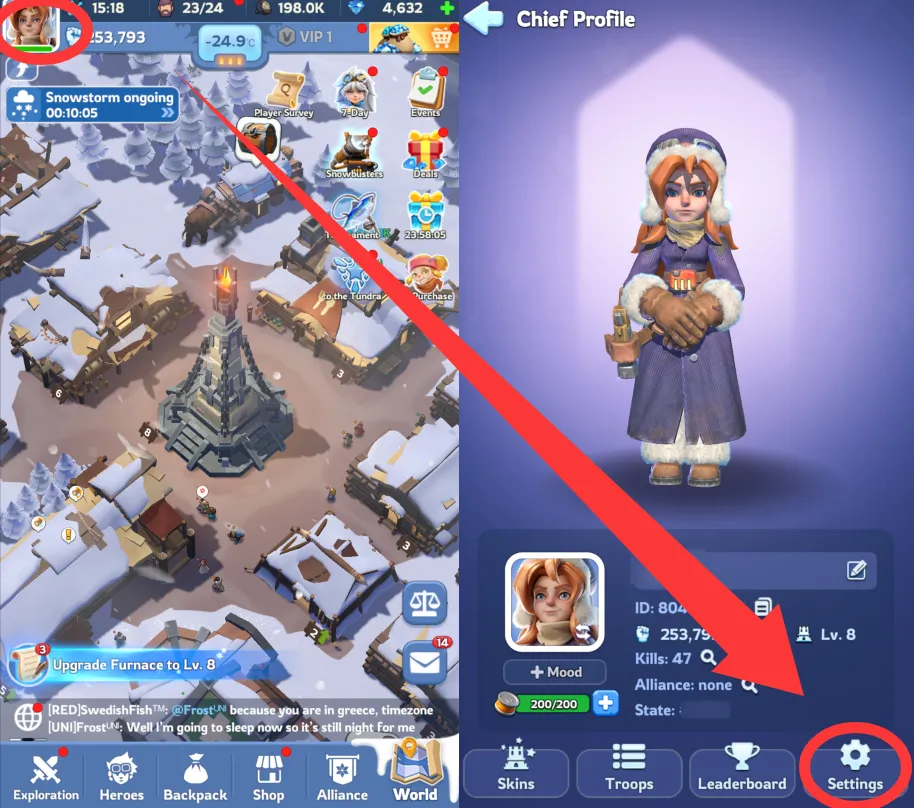
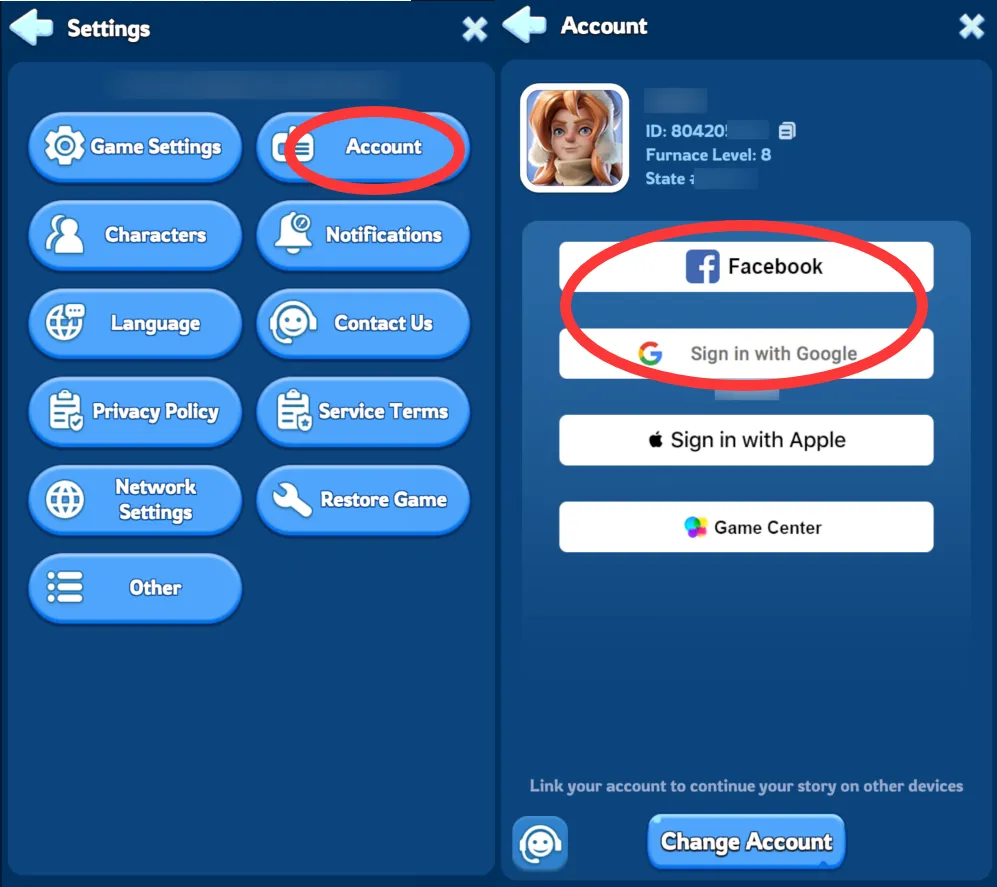
Log in to Whiteout Survival, tap the Gear icon in the upper-right corner, select Account, then link your Google or Facebook account.

Path: Settings → Account → Link Account → Google or Facebook

Open Whiteout Survival settings and account options
Open Settings and select Account
Link a Whiteout Survival account with Google or Facebook
Link Google or Facebook
Using Google? Enable Google 2-Step Verification before ordering. This helps make verification faster and keeps your account more secure.
Google Account

How to Enable Google 2-Step Verification

Complete these steps before placing a WOS login top-up order with a Google-linked account.

01

Open Your Google Account

Tap your Google profile picture and select “Manage your Google Account.”

02

Open Security

Go to the Security section and select “2-Step Verification.”

03

Add Your Phone Number

Tap “Turn on” and enter the phone number you want to link.

04

Confirm the Setup

Tap “Next,” enter the verification code you receive and complete the setup.

✦ Mone Benefits

Why Top Up Whiteout Survival Packs on Mone?

Buy the Whiteout Survival pack you need at competitive prices, with guided order processing and support throughout your WOS login top-up.

💰

Better Value on WOS Packs

Selected Whiteout Survival packs on Mone may cost less than purchasing the equivalent offer directly in the game. Check the displayed price before ordering.

🎁

Buy the Exact Pack You Need

Upload a screenshot of the exact WOS pack you want so the team can confirm its price and contents before completing the purchase.

Delivery in About 5 Minutes

Most WOS login top-up orders are completed in about 5 minutes after the correct account information and any required verification code have been received.

🔐

Careful Account Handling

After the Whiteout Survival top-up is completed, the team logs out of the account and removes the related login history.

💬

Order Tracking and Support

Track your WOS recharge in the Mone Order Center and contact customer support if you need help with payment, verification or delivery.

About the Game

What Is Whiteout Survival?

Whiteout Survival, also known as WOS, is a survival strategy game set in a frozen world. Players develop a city around the Furnace, gather resources, recruit heroes, strengthen troops and cooperate with an alliance to survive increasingly difficult challenges.

Progress depends on how efficiently you manage construction, research, heroes, troops and limited resources. Whiteout Survival packs can provide additional resources, speedups, hero materials and event items that help support different stages of city development.

WOS Pack Guide

What Can You Get from Whiteout Survival Packs?

The contents of WOS packs vary depending on your account, current events and available in-game offers. Before ordering, open the Whiteout Survival shop and take a clear screenshot of the pack you want.

Growth and construction packs — resources and speedups that can support Furnace upgrades, construction and research.

Hero packs — items that may help recruit, upgrade or strengthen heroes.

Event offers — limited-time packs connected to current Whiteout Survival events and account-specific offers.

Passes and recurring benefits — selected passes may provide rewards over a defined period according to their in-game conditions.

Alliance and battle preparation — resources that may help prepare troops, heroes and your city for alliance activities or major events.

Choose a Top-Up Method

WOS Pack Login Top-Up or Frost Stars?

Mone offers two different ways to top up Whiteout Survival. Choose according to whether you want a specific in-game pack or flexible premium currency.

Choose WOS Login Top-Up When:

You want Mone to purchase a specific pack, pass or account-only offer shown in your Whiteout Survival store. This method requires a linked Google or Facebook account and a screenshot of the exact pack.

Choose Whiteout Survival Frost Stars When:

You prefer premium currency that can be added to your Whiteout Survival account using your Whiteout Survival ID without providing account login information. Frost Stars can then be used for eligible in-game purchases.

Buy Whiteout Survival Frost Stars →

Help Center

Whiteout Survival Login Top-Up FAQ

Is it safe to top up Whiteout Survival packs on Mone?
Mone processes the order using the account information you submit. After delivery, the team logs out and removes the related login history. Always place the order through the official Mone website and check that your information is correct.
How long does a WOS login top-up take?
Most orders are completed in about 5 minutes after the correct account information and any required verification code have been received. Processing may take longer if information is incomplete or verification is delayed.
What information is required for a Whiteout Survival top-up?
You need a Whiteout Survival account linked to Google or Facebook, the login email or username, the required login information, your Whiteout Survival ID, server information and a clear screenshot of the exact pack you want to purchase.
Why do I need to upload a screenshot of the pack?
Whiteout Survival pack contents may vary depending on current events, pop-up offers and account progress. A screenshot helps the team identify the correct pack, price and contents.
Can I log in to Whiteout Survival while my order is being processed?
Do not log in to the game until the Mone team confirms that delivery has been completed. Simultaneous login may interrupt account verification or pack delivery.
What should I do if a verification code is requested?
Monitor online support messages after submitting your information. If verification is required, provide the current code promptly so the team can continue processing the order.
What should I do if the top-up is delayed?
Check the order status in the Mone Order Center and make sure no additional information or verification code is required. If the order remains delayed, contact customer support and provide your order number.
Can a completed WOS pack order be refunded?
Refund eligibility depends on the current order status and Mone’s applicable policy. Completed or delivered in-game purchases generally cannot be reversed. Contact support as soon as possible if there is a problem with your order.
What is the difference between WOS pack top-up and Frost Stars?
Login top-up is used to purchase a specific Whiteout Survival pack shown on your account. Frost Stars are premium currency delivered to your Whiteout Survival account using your Whiteout Survival ID and can be spent later on eligible in-game offers.
pegiteen

Copyright © 2026 by NexaPlay Technology Limited.

Registration Number: 80592435

Address:Room E29, Flat 1, 13/F, Block C, Hang Wai Industrial Centre, 6 Kin Tai Street, Tuen Mun, Hong Kong